
Overview of the InspectorPrime Ecosystem
The InspectorPrime ecosystem is a business management and inspection reporting framework designed for the Airtable environment. It transitions the software delivery model from a service-based subscription (SaaS) to a client-owned asset.
Structural Architecture & Ownership
Unlike traditional cloud-based inspection tools, InspectorPrime is deployed directly into a client's private Airtable Business Account. This architecture establishes two primary operational conditions:
- Software Ownership: Possession of the system is perpetual following a one-time purchase. The client retains the software instance regardless of their ongoing relationship with InspectorPrime.
- Data Sovereignty: All inspection data, client records, and media are hosted within the client's private database. InspectorPrime does not have access to, nor store, any proprietary business data.
 Software Ownership: Possession of the system is perpetual following a one-time purchase. The client retains the software instance regardless of their ongoing relationship with InspectorPrime.
Financial Model
The fiscal structure is designed to decouple software functionality from recurring revenue models.
| Expense Type | InspectorPrime Model | Traditional SaaS Model |
|---|---|---|
| Licensing | One-time purchase (Lifetime) | Monthly or Annual Subscription |
| Usage Fees | $0 per report / $0 per user | Per-report or per-user surcharges |
| Platform Costs | Direct-to-Airtable (Third-party) | Integrated into vendor subscription |
| Revenue Share | None | Often includes vendor-side markups |
Functional Specifications
The platform provides an enterprise-grade suite for both residential and commercial operations:
- Reporting: Customizable inspection reports compliant with InterNACHI®, ASTM E2018, CCPIA® COMSOP, and state-specific regulations.
- Operational Management: Integrated modules for CRM, automated scheduling, and multi-inspector dispatching.
- Administrative Tools: Automated commission tracking, equipment inventory, and vehicle maintenance logs.
- Connectivity: Native integration with Airtable's Open API, supporting up to 50 automations and 100,000 monthly automation runs and third-party connections via Zapier or Make.
- Security: Utilizes Airtable's enterprise data security protocols; notably, data is excluded from AI model training.
Comparison of Operating Environments
| Attribute | Ownership Environment (InspectorPrime) | Subscription Environment (Standard SaaS) |
|---|---|---|
| System Control | Full access to core logic and workflows. | Limited to vendor-provided settings. |
| Branding | Complete white-labeling (No vendor logos). | Often requires "Pro" tiers for white-labeling. |
| Persistence | System remains active if payments cease. | System access is revoked upon cancellation. |
| Data Storage | Up to 100GB per inspection. | Variable, often capped by vendor tiers. |
Conclusion
The InspectorPrime model is built for firms prioritizing long-term cost savings and data autonomy. By removing the vendor as a middleman for data and hosting, firms can ensure their core operational tools remain a permanent company asset.
Custom Systems for Every Aspect of Your Business
InspectorPrime is a complete business system for inspection professionals, offered as a one-time, lifetime license. It is a modular system with three parts: InspectorPrime Office for managing operations, InspectorPrime Residential for home inspections, and InspectorPrime Commercial. The residential system is compatible with all state SOPs, including the Texas TREC 7-6. The commercial system is compliant with CCPIA® COMSOP, ASTM E2018, and Phase I ESA reporting standards.
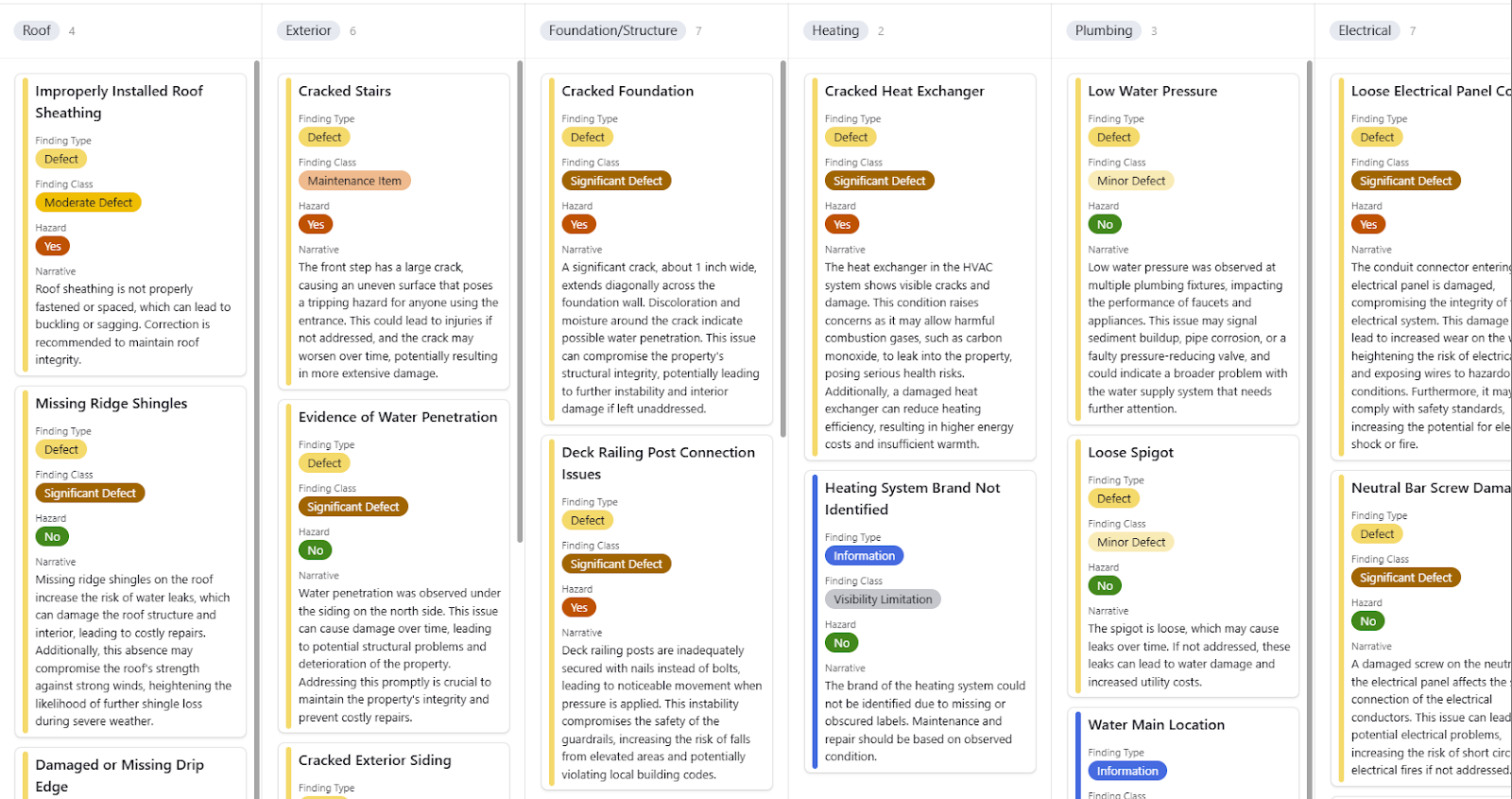
InspectorPrime Residential
InspectorPrime Residential is a high-performance inspection reporting system built for clear reporting and field efficiency. It moves the inspection process away from rigid templates and into a flexible, data-driven system.
Advanced Reporting System
The system is built to meet both client needs and legal requirements through a simple, organized structure.
- Standards and Regulations: Ready to use for InterNACHI® Standards of Practice, and various state-specific regulations, including the Texas TREC 7-6.
- Client Request Sheet: A unique feature that lets agents and clients export inspection data directly. This makes it easy for them to create repair or credit requests.
- Reinspection Tool: Handle follow-up inspections within the original inspection report. Updates to findings automatically show up in a special Reinspection Dashboard for the client, keeping all information in one place.
- Branded Client Portal: A portal that shows only your company logo and info for a professional look.
- High-Capacity Storage: Plenty of room for high-quality photos and videos, with up to 100GB of space per inspection.
Inspector Tools and Field Workflow
The system saves time on-site by putting everything the inspector needs into one mobile-friendly portal.
- Custom Inspector Portal: An interface you can change to fit your company's specific checklists, guides, and way of doing things.
- Narrative Library: Quick access to a large library of pre-written comments, ensuring your team uses consistent language on every job.
- Inspector Dashboard: Built for companies with multiple inspectors. It allows for real-time tracking so a supervisor can review findings for quality before the inspector even leaves the house.
Built-In AI Features
Unlike other software that adds AI as an afterthought, InspectorPrime has AI built into its core.
- Private AI Training: You can choose and train your AI models to understand your local building codes, company policies, and regional terms.
- Client AI Assistant: An optional, secure AI tool inside the client portal. It helps homeowners and agents ask questions about the report and get answers instantly based on your findings.
Combining Residential and Office Tools
When you use the Residential system with the InspectorPrime Office system, it becomes a complete business operating system managing CRM, smart scheduling, automations, and business data analytics.
System Walkthrough
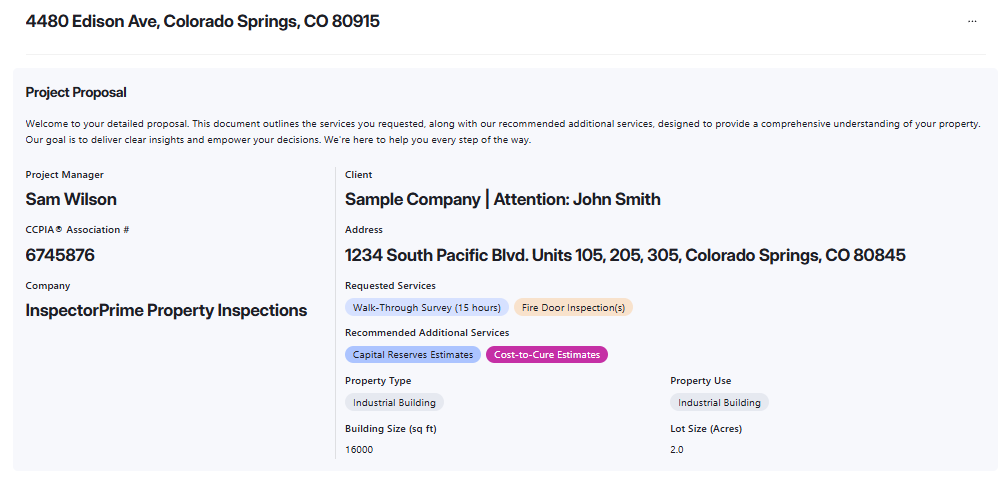
InspectorPrime Commercial
InspectorPrime Commercial is built for complex commercial property assessments. It provides the structure needed for inspecting all types of commercial properties, multi-unit properties, and allows inspectors to complete ASTM E2018, CCPIA® COMSOP, Phase I ESA and multiple ancillary reports and questionnaires all within a single system.
Compliance and Specialized Reports
The system is modeled after CCPIA® COMSOP and ASTM E2018 standards to ensure reports meet industry expectations.
- Core Standards: Generate walk-through surveys and summary reports compliant with commercial and state-specific regulations.
- Financial Analysis: Build Cost-to-Cure and Capital Reserve analyses. The system provides interactive dashboards and sheets to help clients visualize long-term costs.
- Specialized Modules: Includes reporting tools for Phase I ESA, Accessibility, Fire Doors, Radon Mitigation, Chimney inspections, and more.
- Media Capacity: Each inspection supports up to 100GB of storage for high-resolution photos and video.
- Collaborative Dashboards: Allows multiple inspectors to work on the same project with real-time oversight.
- White-Labeled Branding: All client portals and reports are branded exclusively to your company.
Equipment Schedules and Data Collection
Managing large-scale properties requires tracking a high volume of mechanical assets.
- Asset Tracking: Create records for all major equipment, including photos/videos, manufacturer, estimated age, and condition.
- Equipment Dashboards: Use charts and sheets to give clients an overview of system distribution and current asset health.
- Built-In Questionnaires: Send pre-inspection and accessibility questionnaires to clients or site contacts. Responses feed directly into the system for analysis.
AI-Native Workflow
Commercial assessments involve large amounts of data. The system uses built-in AI to help organize and process site information.
- Field Note Processing: Inspectors and third-party contractors, at no cost, can submit on-site notes. The AI summarizes this data to help compile the final report.
- Drafting Assistance: Use the AI assistant to help generate executive summaries, cost estimates, and complex narratives based on your company's specific policies.
- Contractor Management: Centralize data from various specialists (HVAC, Electrical, etc.) within a single project record.
Commercial and Office System Integration
When paired with the InspectorPrime Office System, the Commercial tool functions as a full business management system for team management, resource tracking, advanced CRM, and scheduling.
System Walkthrough
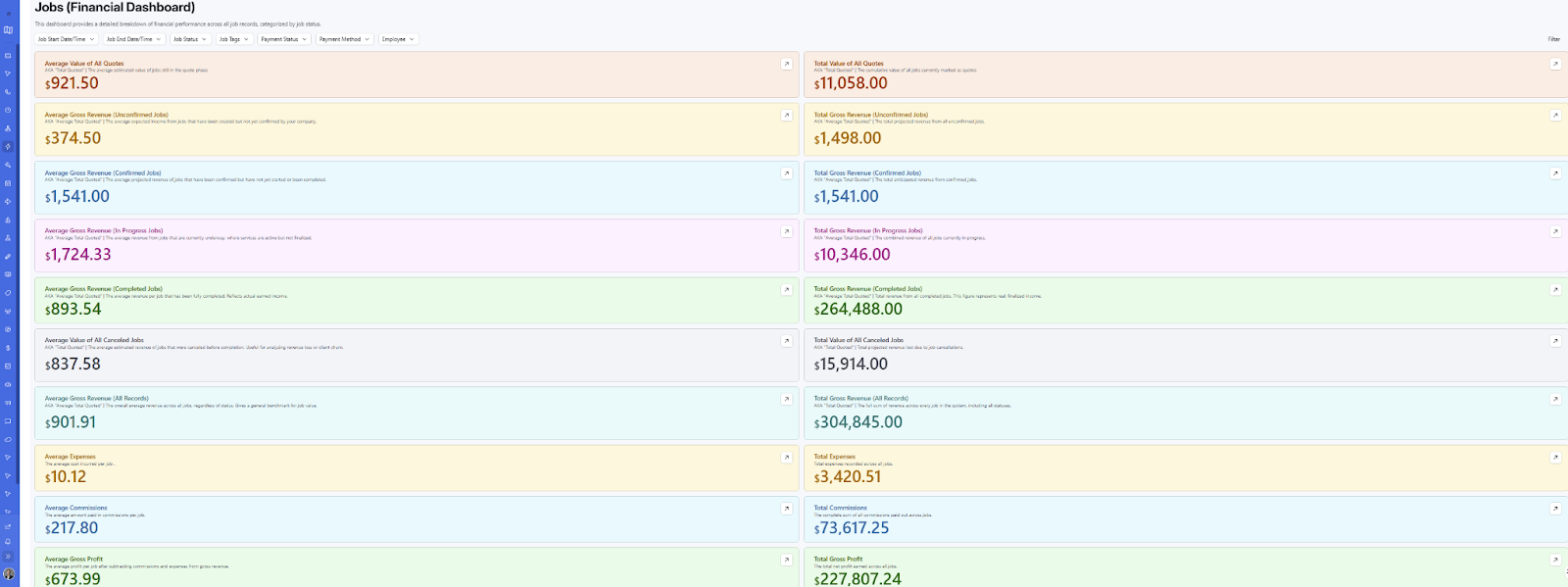
InspectorPrime Office
InspectorPrime Office is a complete operating system for your firm. It moves your scheduling, finances, and team management into one private, owner-controlled environment.
Vendor Independence: Payments and Agreements
A core principle of the Office System is that you are not locked into specific vendors for your essential business transactions.
- Payment Processing: You choose and bring your own payment processor. We do not force you into a proprietary payment gateway or take a cut of your revenue.
- E-Signatures: You manage your own digital agreements and e-signature tools. You have full control over which services you integrate with InspectorPrime to handle your legal contracts.
CRM and Communication
Manage your professional network and client relationships without third-party middleman fees.
- Contact Management: Centralized database for clients, real estate agents, vendors, and contractors.
- Referral Tracking: Monitor which agents and sources are driving your business to identify your most valuable partnerships.
- Review Monitoring: Keep track of company reviews and feedback to manage your professional reputation.
Scheduling and Workflow
A flexible system designed to handle the logistics of single-person operations or large multi-inspector firms.
- Time Slot Management: Manage inspector availability and schedule jobs with an integrated calendar.
- Job Initiation: Workflows to start new projects, track inspections and their related services, and assign tasks to specific team members.
- KPI Tracking: Monitor Key Performance Indicators in real-time to see how efficiently your business is running.
Team and Resource Management
The Office System includes tools to manage the physical and human assets of your company.
- Employee Scheduling: Organize shifts and assignments for your entire inspection team.
- Training & Compliance: Maintain digital logs for employee training and certifications.
- Equipment Inventory: Track your company's tools and gear, including maintenance and replacement dates.
- Vehicle Management: Monitor your fleet with logs for maintenance and vehicle tracking.
AI, Automation, and Integration
Built on an AI-native foundation, the Office System automates repetitive tasks so you can focus on inspections.
- Workflow Automation: Support for up to 100,000 monthly automations. Send report links, payment requests, and contracts automatically.
- Custom AI Models: Choose and train your AI models to support your office tasks and data analysis.
- Connectivity: Uses Airtable's Open API to connect seamlessly with external tools like Google, Microsoft, Zapier, and Make.
Centralized Analytics
The Office System provides a holistic view of your business performance through customizable dashboards. Instead of digging through spreadsheets, you get a clear visual representation of your growth, inspector productivity, and financial health.
Key System Components
- Private Data Hosting: All business and financial data stays in your private Airtable account.
- White-Labeled Experience: The administrative side is tailored to match your company's internal identity.
- Financial Management: Log expenses, automatically calculate commissions for employees and vendors, and generate custom financial reports.
System Walkthrough
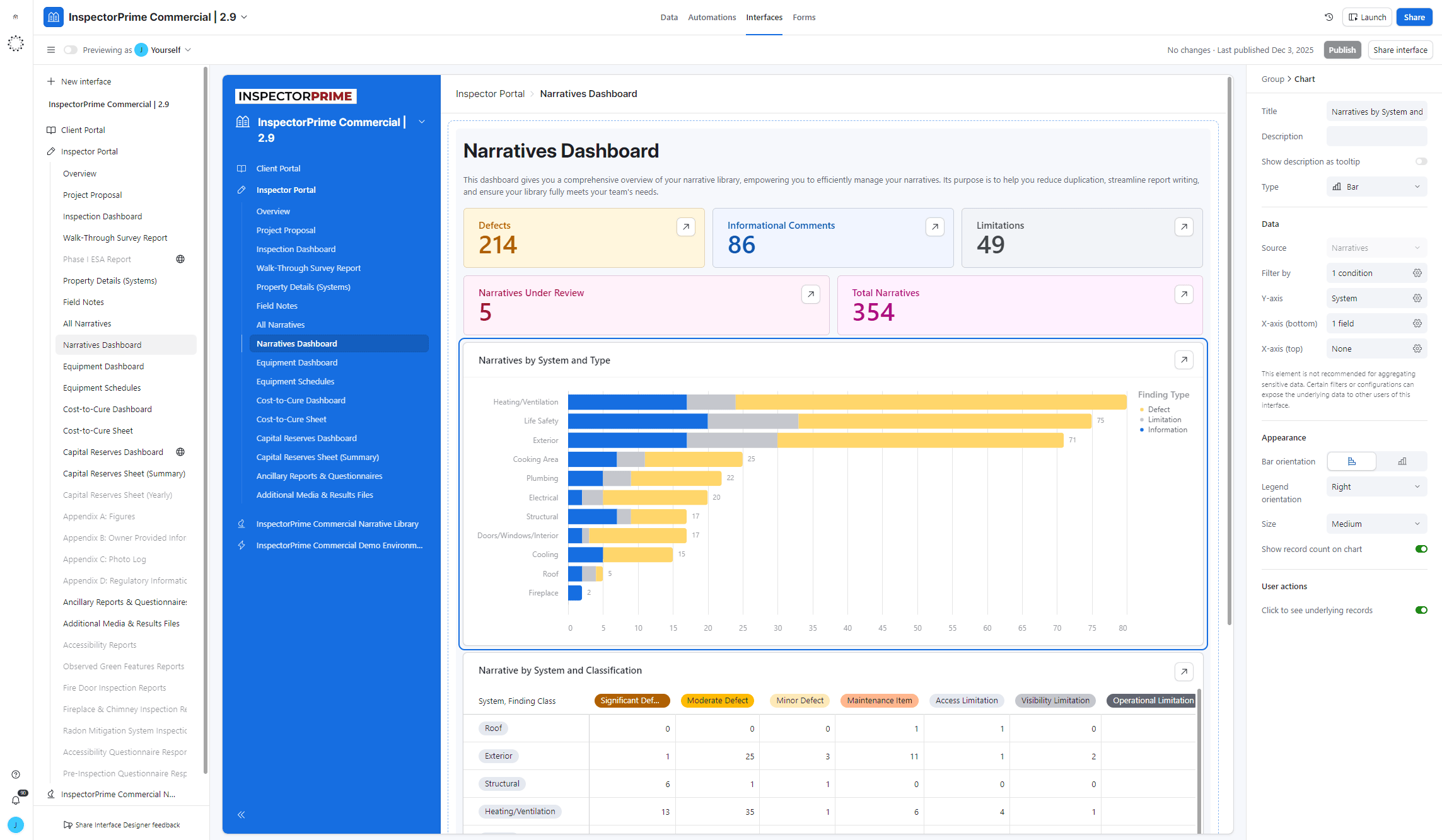
Client Support & Professional Services
We support our clients through a structured range of support services.
Free Live Group Training
We offer frequent, complimentary live group training sessions focused on practical application and detailed feature mastery for all current InspectorPrime users.
- Focus: Sessions are guided by our developers, centered on live training, troubleshooting, and addressing user-submitted queries.
- Content: Dedicated sessions cover the InspectorPrime Office (Administration, CRM, Financials) and InspectorPrime Residential & Commercial (Reporting, Field Workflow) systems.
- Access: All 60-minute sessions are recorded and made available via YouTube and the documentation system.
1-on-1 Private Consultations
Private consultations provide focused, direct assistance for users/teams requiring specialized support in system configuration or advanced implementation.
- Focus Areas: Resolving specific workflow issues, advanced feature integration, system optimization, and customized training.
- Structure: Billed at $125 per hour, sessions are scheduled in 60-minute increments.
- Booking: The process is personally managed by our developers to align with the client's needs.
Custom Development Services
This service allows companies to leverage the flexible Airtable foundation to implement bespoke solutions for unique or highly specialized operational requirements.
- Capabilities: Includes modification and expansion of the system through custom automations, third-party integrations, specialized user interfaces, and the creation of new workflows and features.
- Pricing: Billed at a flat rate of $200 per hour.
- Process: All projects are preceded by a discovery session to define a clear scope, detailed plan, and fixed estimate, requiring client approval before development commences.
See InspectorPrime in Action
Schedule a live demo with our developers to see if InspectorPrime is right for your business.
Schedule Live Demo